---
title: Booking a Meeting in G&H Automation Client Portal
description: This article shows How to Book a Meeting within the G&H Automation Client Portal.
---
[Skip to content](https://knowledge.gnhautomation.com/booking-a-meeting-in-gh-automation-client-portal#main-content)
English
Show submenu for translations

Open main navigation
Close main navigation
- English
Show submenu for translations
- Client Portal
Client Portal
Bonjour. Need help?
- There are no suggestions because the search field is empty.
1. [Knowledge Base](https://knowledge.gnhautomation.com/?hsLang=en)
2. [G&H Client Portal](https://knowledge.gnhautomation.com/gh-client-portal?hsLang=en)
# Booking a Meeting in G&H Automation Client Portal
## This article shows "How to Book a Meeting within the G&H Automation Client Portal".
---
#### 📚Table of Contents
1\. Overview
2\. How to Book a Meeting
3\. Key takeaways
---
### Overview
With our updated client portal, clients now have the added convenience of easily booking meetings at a convenient time for both parties. By simply logging into their account, clients can view available time slots and select a time that works best for them. This saves both parties time and ensures that meetings are booked within a suitable time frame. Moreover, clients have the option to book meetings at different times based on their needs, providing them with more flexibility and control over their schedules. Overall, this feature enhances the client experience and makes it easier for clients to engage with our services.
### 
### How to Book a Meeting?
**Step 01:**
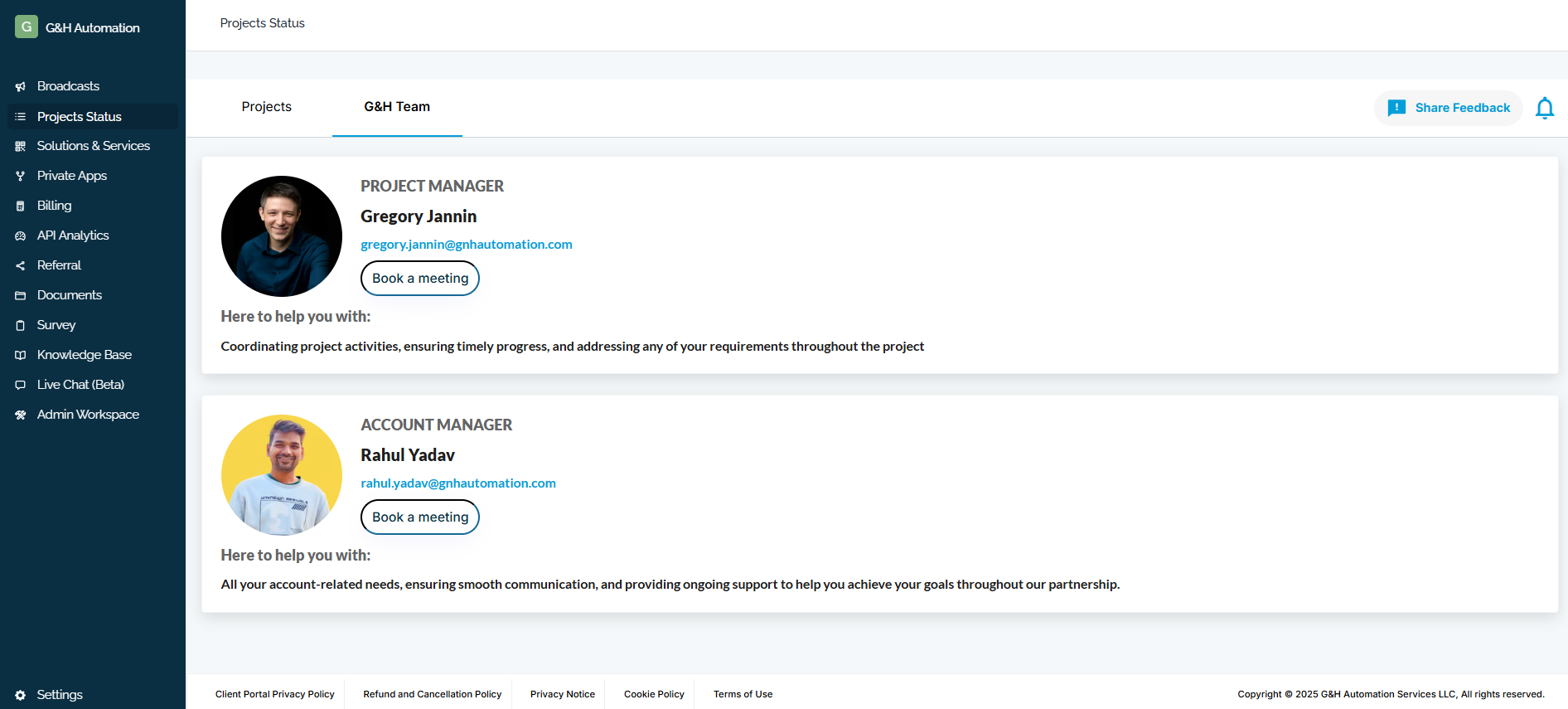
Access the Client Portal, then select "Project Status" from the menu. Next, navigate to "G&H Team".

**Step 2:**
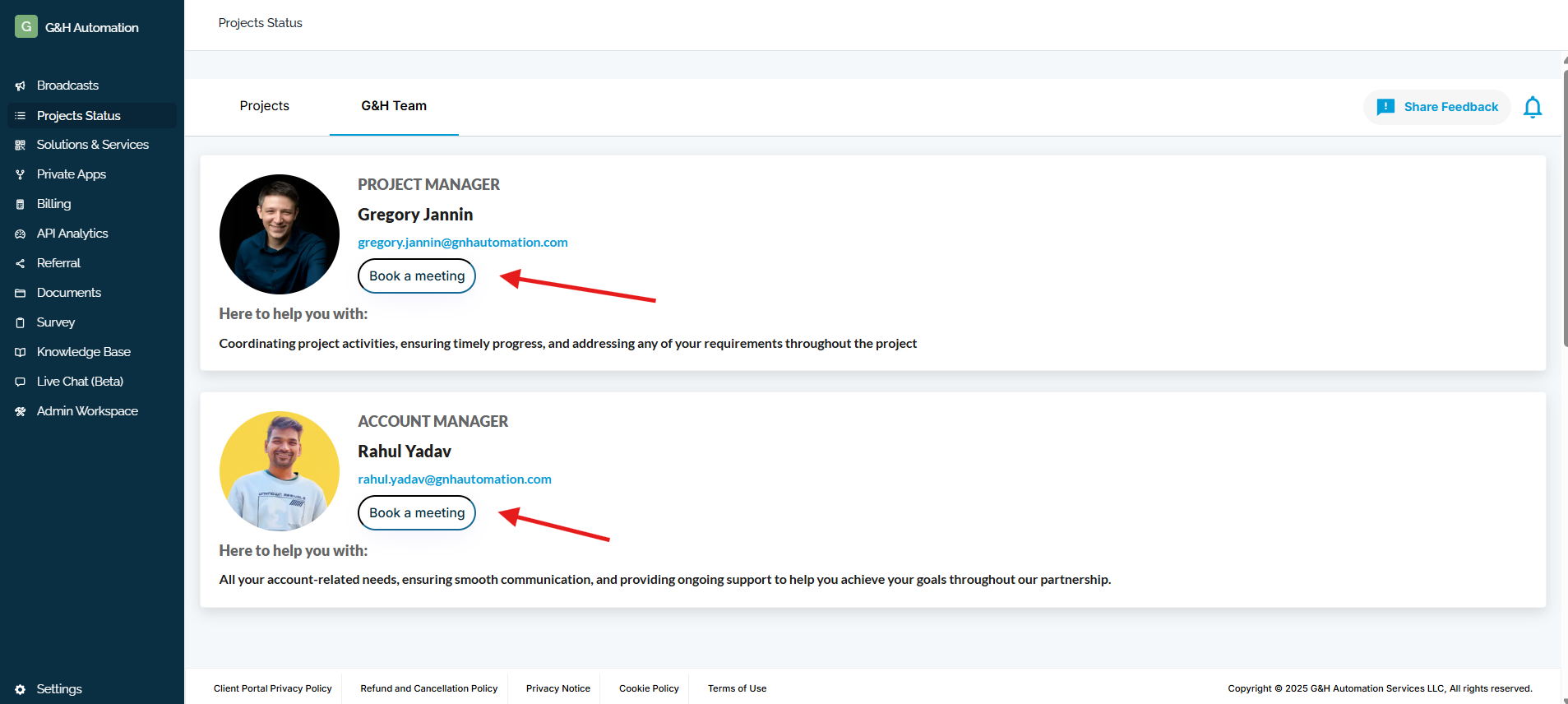
Now, click on "Book a Meeting" with your preferred person.
#### **For Your Information:**
**Project Manager:** Coordinating project activities, ensuring timely progress, and addressing any of your requirements throughout the project.
**Account Manager:** All your account-related needs, ensuring smooth communication, and providing ongoing support to help you achieve your goals throughout our partnership.
**Step 3:**
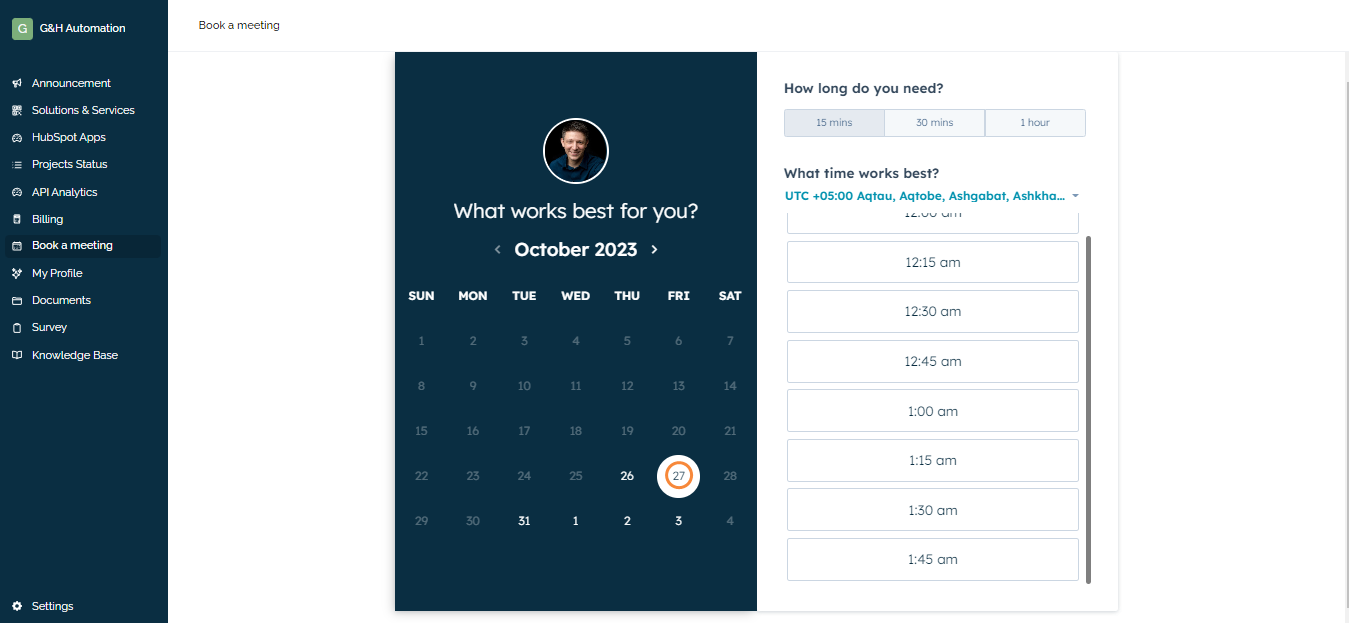
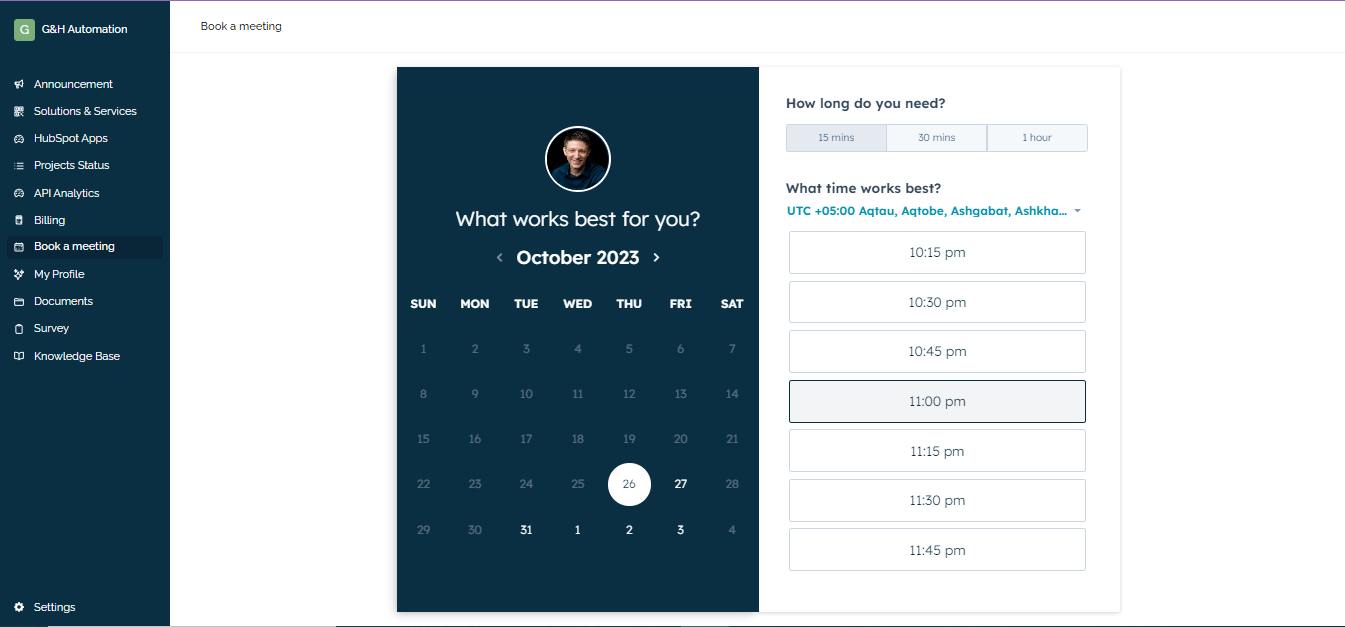
Choose the preferred date (only bright ones can be selected).
**Step 4**:
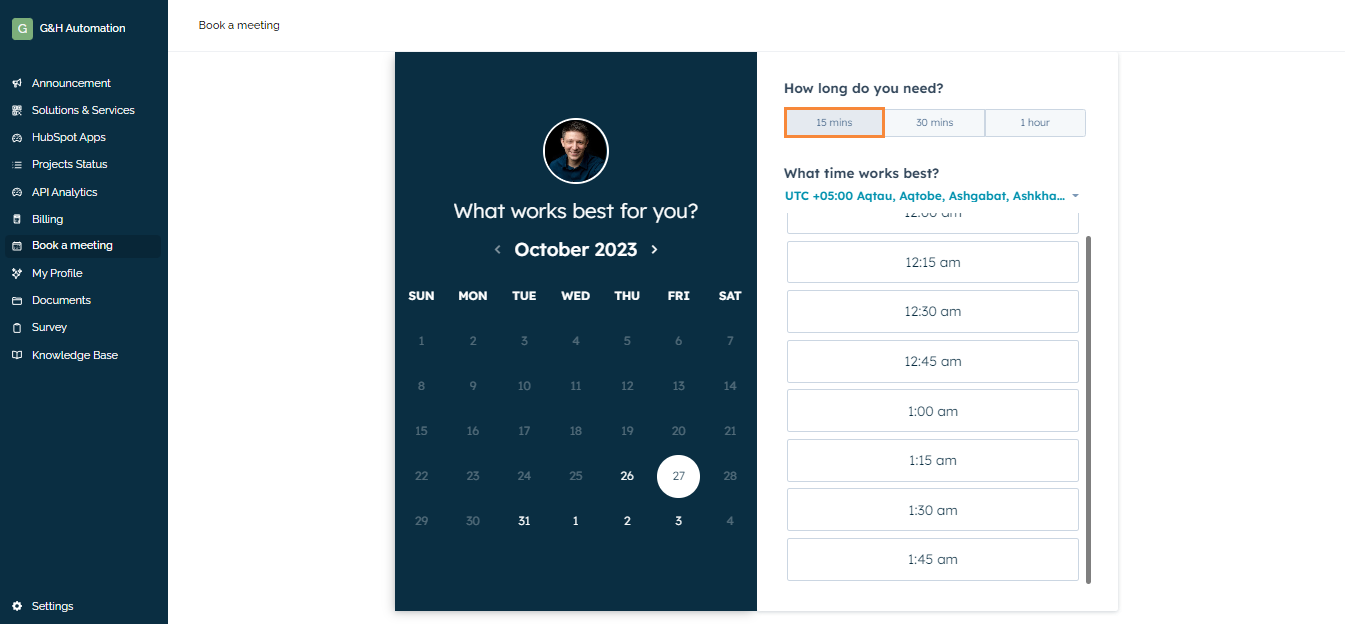
Now, select the duration of the meeting you need.
**Step 04:**
Select the time that works best for you. This will open a new Window.
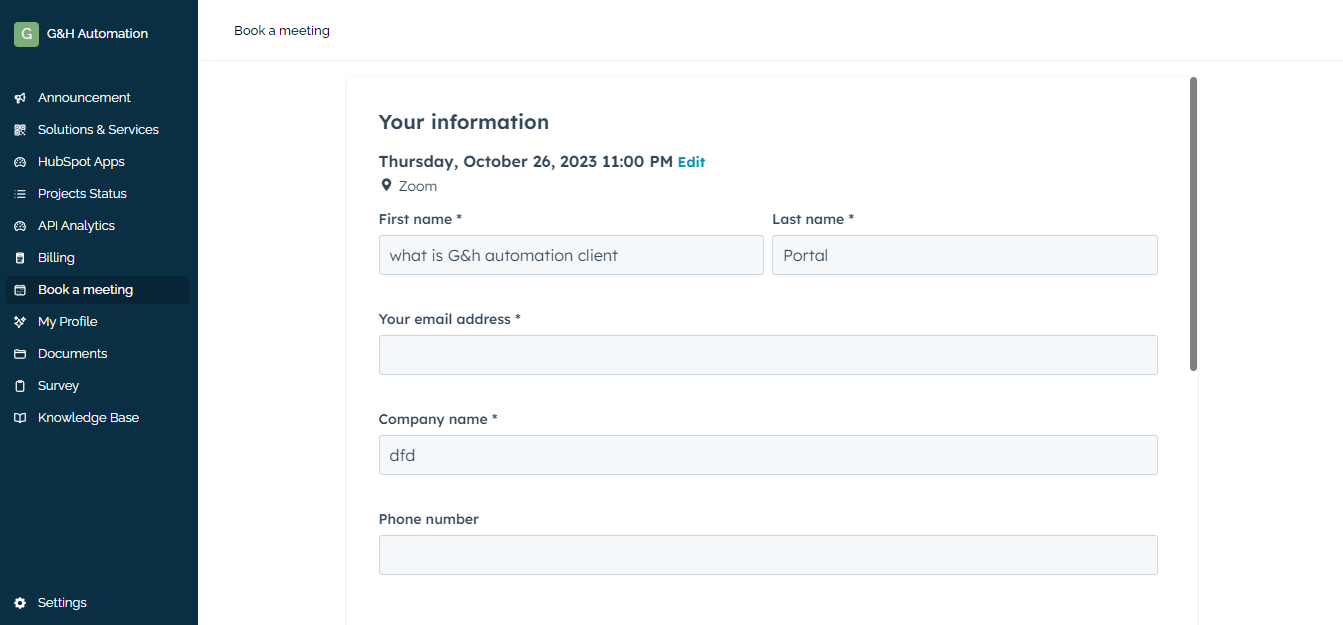
**Step 05:**
Accurately fill in all the details.
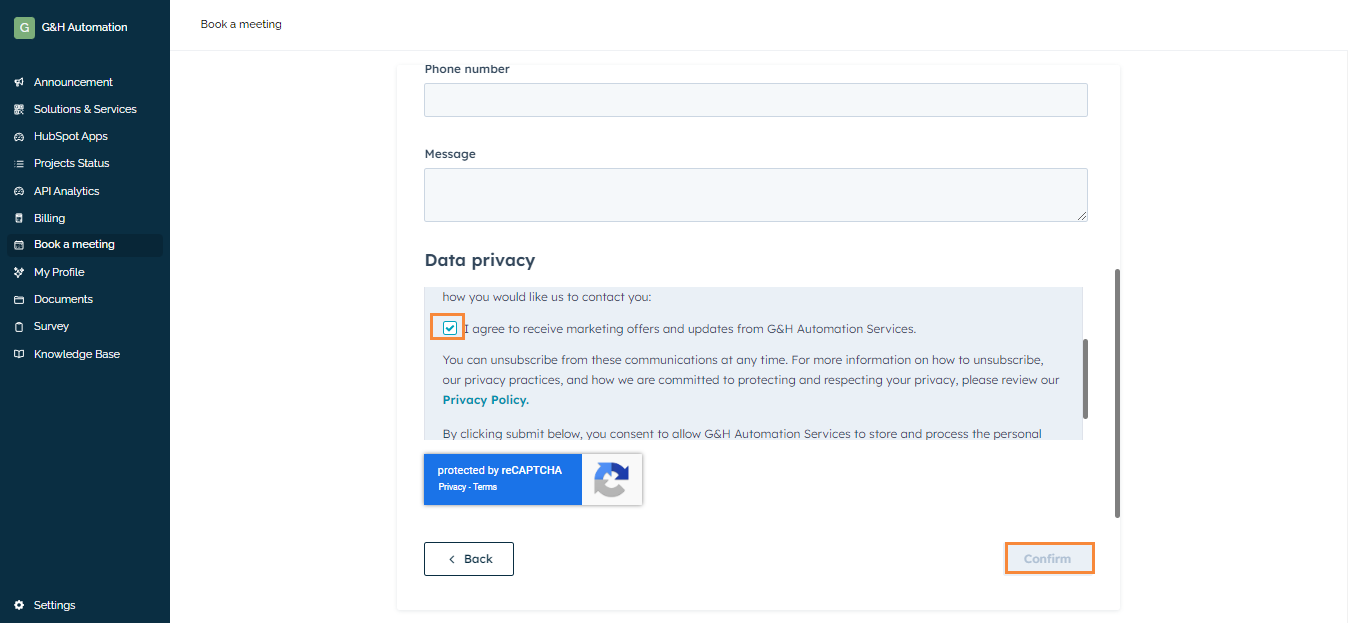
**Step 06:**
Complete the captcha, agree to the Privacy Policy, and click on confirm. You are good to go.
### Key takeaways
Clients can now book meetings with G&H Automation through the client portal.
This allows for:
- Selecting convenient times for both parties
- Increased flexibility for clients
- Improved client experience
---
### **💡**Looking for Help?
Do you have further queries or require additional clarification? Feel free to reach out.
- [G&H Client Portal](https://knowledge.gnhautomation.com/gh-client-portal?hsLang=en#main-content)
- [Plans & Billing (Legal & Payments)](https://knowledge.gnhautomation.com/gh-client-portal?hsLang=en#plans-billing-legal-payments)
- [Support Tickets](https://knowledge.gnhautomation.com/gh-client-portal?hsLang=en#support-tickets)
- [Help Articles](https://knowledge.gnhautomation.com/gh-client-portal?hsLang=en#help-articles)
- [Getting Started](https://knowledge.gnhautomation.com/gh-client-portal?hsLang=en#getting-started)
- [Team Management](https://knowledge.gnhautomation.com/gh-client-portal?hsLang=en#team-management)
- [G&H Automation Services](https://knowledge.gnhautomation.com/gh-automation-services?hsLang=en#main-content)
- [HubSpot Advisory Services](https://knowledge.gnhautomation.com/gh-automation-services?hsLang=en#hubspot-advisory-services)
- [Custom API Integration](https://knowledge.gnhautomation.com/gh-automation-services?hsLang=en#custom-api-integration)
- [MS Office Automation](https://knowledge.gnhautomation.com/gh-automation-services?hsLang=en#ms-office-automation)
- [Dropbox Sign](https://knowledge.gnhautomation.com/gh-automation-services?hsLang=en#dropbox-sign)
- [Aircall](https://knowledge.gnhautomation.com/gh-automation-services?hsLang=en#aircall)
- [Support Services](https://knowledge.gnhautomation.com/gh-automation-services?hsLang=en#support-services)
- [Web App Maintenance Service](https://knowledge.gnhautomation.com/gh-automation-services?hsLang=en#web-app-maintenance-service)
- [CRM Data Migration Service](https://knowledge.gnhautomation.com/gh-automation-services?hsLang=en#crm-data-migration-service)
- [HubSpot Fractional CTO Services](https://knowledge.gnhautomation.com/gh-automation-services?hsLang=en#hubspot-fractional-cto-services)
- [HubSpot Audit Service](https://knowledge.gnhautomation.com/gh-automation-services?hsLang=en#hubspot-audit-service)
- [Legal Policies](https://knowledge.gnhautomation.com/legal-policies?hsLang=en#main-content)
- [Data Protection](https://knowledge.gnhautomation.com/legal-policies?hsLang=en#data-protection)
- [Website T&C](https://knowledge.gnhautomation.com/legal-policies?hsLang=en#website-tc)
- [Microsoft Office Automation](https://knowledge.gnhautomation.com/microsoft-office-automation?hsLang=en)
- [Working Together](https://knowledge.gnhautomation.com/working-together?hsLang=en#main-content)
- [Partnerships](https://knowledge.gnhautomation.com/working-together?hsLang=en#partnerships)
- [Referrals](https://knowledge.gnhautomation.com/working-together?hsLang=en#referrals)
- [Google Automation](https://knowledge.gnhautomation.com/google-automation?hsLang=en)
[](http://www.gnhautomation.com)
[mailto:email@email.com](mailto:email@email.com)
Copyright © 2026, G&H Automation Services