---
title: How to Submit a Support Ticket?
description: To ensure your issue is resolved as quickly and efficiently as possible, follow these simple steps to submit a support ticket.
---
[Skip to content](https://knowledge.gnhautomation.com/how-to-submit-a-support-ticket#main-content)
English
Show submenu for translations

Open main navigation
Close main navigation
- English
Show submenu for translations
- Client Portal
Client Portal
Bonjour. Need help?
- There are no suggestions because the search field is empty.
1. [Knowledge Base](https://knowledge.gnhautomation.com/?hsLang=en)
2. [G&H Client Portal](https://knowledge.gnhautomation.com/gh-client-portal?hsLang=en)
3. [Support Tickets](https://knowledge.gnhautomation.com/gh-client-portal?hsLang=en#support-tickets)
# How to Submit a Support Ticket?
## To ensure your issue is resolved as quickly and efficiently as possible, follow these simple steps to submit a support ticket.
### Step-by-Step Guide
1. **Go to the Support Portal**
👉 Visit: [https://support.gnhautomation.com/tickets?offset=0](https://support.gnhautomation.com/tickets?offset=0&hsLang=en)
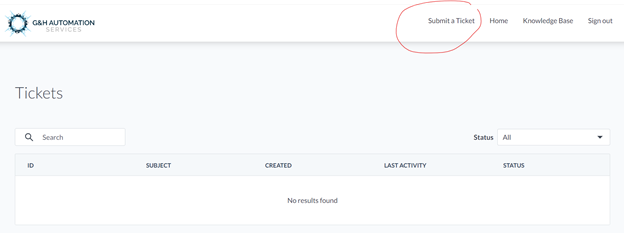
1. **Click “Submit a ticket”**
🖱 You'll find this button on the **top right menu bar**.
2. **Fill in the Ticket Form**
Provide all the required information carefully. Here's what to include:
- **Issue (Title):**
Write a brief sentence that clearly describes the issue.
*Example: “Invoice not generating for Order #12345”*
📝 *This becomes the title of your ticket and helps you find it easily later.*
- **Details:**
Include as much relevant information as possible:
- Client or Order number
- Date and time (or frequency) of the issue
- A clear and detailed explanation of the problem
- Steps you've already tried to fix it (if any)
- Attach **screenshots** or a **video recording** if possible
📸 *Visuals help us understand and resolve the issue faster!*
3. **Submit Your Ticket**
✅ Once all the information is filled in, click **Submit**.
---
### 🔁 Track Your Ticket
- You can **follow the status** of your ticket through your **Client Portal**.
- Click on a specific ticket to view:
- The **conversation history**
- The option to **reply directly** with updates or questions
---
### **💡**Looking for Help?
Do you have further queries or require additional clarification? Feel free to reach out.
- [G&H Client Portal](https://knowledge.gnhautomation.com/gh-client-portal?hsLang=en#main-content)
- [Plans & Billing (Legal & Payments)](https://knowledge.gnhautomation.com/gh-client-portal?hsLang=en#plans-billing-legal-payments)
- [Support Tickets](https://knowledge.gnhautomation.com/gh-client-portal?hsLang=en#support-tickets)
- [Help Articles](https://knowledge.gnhautomation.com/gh-client-portal?hsLang=en#help-articles)
- [Getting Started](https://knowledge.gnhautomation.com/gh-client-portal?hsLang=en#getting-started)
- [Team Management](https://knowledge.gnhautomation.com/gh-client-portal?hsLang=en#team-management)
- [G&H Automation Services](https://knowledge.gnhautomation.com/gh-automation-services?hsLang=en#main-content)
- [HubSpot Advisory Services](https://knowledge.gnhautomation.com/gh-automation-services?hsLang=en#hubspot-advisory-services)
- [Custom API Integration](https://knowledge.gnhautomation.com/gh-automation-services?hsLang=en#custom-api-integration)
- [MS Office Automation](https://knowledge.gnhautomation.com/gh-automation-services?hsLang=en#ms-office-automation)
- [Dropbox Sign](https://knowledge.gnhautomation.com/gh-automation-services?hsLang=en#dropbox-sign)
- [Aircall](https://knowledge.gnhautomation.com/gh-automation-services?hsLang=en#aircall)
- [Support Services](https://knowledge.gnhautomation.com/gh-automation-services?hsLang=en#support-services)
- [Web App Maintenance Service](https://knowledge.gnhautomation.com/gh-automation-services?hsLang=en#web-app-maintenance-service)
- [CRM Data Migration Service](https://knowledge.gnhautomation.com/gh-automation-services?hsLang=en#crm-data-migration-service)
- [HubSpot Fractional CTO Services](https://knowledge.gnhautomation.com/gh-automation-services?hsLang=en#hubspot-fractional-cto-services)
- [HubSpot Audit Service](https://knowledge.gnhautomation.com/gh-automation-services?hsLang=en#hubspot-audit-service)
- [Legal Policies](https://knowledge.gnhautomation.com/legal-policies?hsLang=en#main-content)
- [Data Protection](https://knowledge.gnhautomation.com/legal-policies?hsLang=en#data-protection)
- [Website T&C](https://knowledge.gnhautomation.com/legal-policies?hsLang=en#website-tc)
- [Microsoft Office Automation](https://knowledge.gnhautomation.com/microsoft-office-automation?hsLang=en)
- [Working Together](https://knowledge.gnhautomation.com/working-together?hsLang=en#main-content)
- [Partnerships](https://knowledge.gnhautomation.com/working-together?hsLang=en#partnerships)
- [Referrals](https://knowledge.gnhautomation.com/working-together?hsLang=en#referrals)
- [Google Automation](https://knowledge.gnhautomation.com/google-automation?hsLang=en)
[](http://www.gnhautomation.com)
[mailto:email@email.com](mailto:email@email.com)
Copyright © 2026, G&H Automation Services