
Step-by-Step Guide
-
Go to the Support Portal
👉 Visit: https://support.gnhautomation.com/tickets?offset=0
-
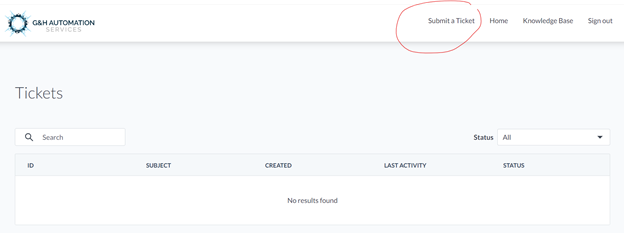
Click “Submit a ticket”
🖱 You'll find this button on the top right menu bar. -
Fill in the Ticket Form
Provide all the required information carefully. Here's what to include:-
Issue (Title):
Write a brief sentence that clearly describes the issue.
Example: “Invoice not generating for Order #12345”
📝 This becomes the title of your ticket and helps you find it easily later. -
Details:
Include as much relevant information as possible:-
Client or Order number
-
Date and time (or frequency) of the issue
-
A clear and detailed explanation of the problem
-
Steps you've already tried to fix it (if any)
-
Attach screenshots or a video recording if possible
📸 Visuals help us understand and resolve the issue faster!
-
-
-
Submit Your Ticket
✅ Once all the information is filled in, click Submit.
🔁 Track Your Ticket
-
You can follow the status of your ticket through your Client Portal.
-
Click on a specific ticket to view:
-
The conversation history
-
The option to reply directly with updates or questions
-
💡Looking for Help?
Do you have further queries or require additional clarification? Feel free to reach out.