
📚 Table of Contents
1. Overview
2. Creating a New Document
3. Key Takeaways
Overview
This platform provides a secure and confidential way to submit vital business documents, including audit reports, financial statements, and other sensitive information. Using the secure server, all documents are stored safely and can only be accessed by authorized personnel, ensuring confidentiality. Additionally, the platform provides a convenient and organized way to manage and track document submissions, making it easier to keep track of important information and maintain accurate record-keeping.
In addition to securely storing your important business documents and providing access only to authorized personnel. The G&H Automation client portal also offers several other useful features such as renaming your documents, previewing them before downloading them, and downloading them to your local device for offline access. Additionally, if you need to remove a document, you can delete it from the portal with just a few clicks. These features make managing your documents more efficient and streamlined, saving you valuable time and effort.

Creating a new Document
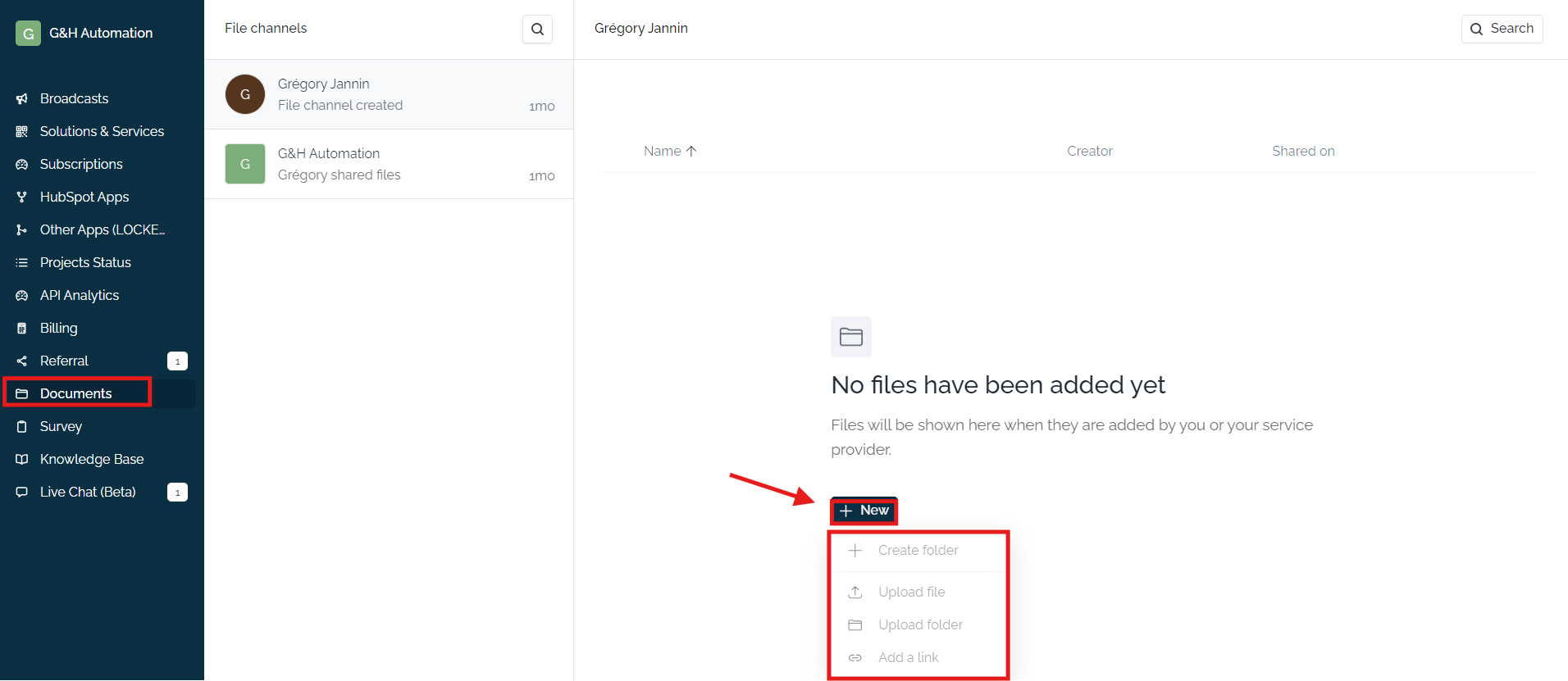
The G&H Automation Client Portal also offers a few additional capabilities to better assist you in managing your documents. For instance, you can create different folders to organize your documents. Furthermore, you can upload files directly from your device, or add a link to the document if it is hosted on an external site. With these added features, you can easily keep track of all your important business documents in one central location, making it easier to access and manage them as needed.
Key Takeaways
- Secure & Organized: Store documents securely, manage them with folders, and control access for confidentiality.
- Convenient Management: Preview, download, and delete documents for efficient document handling.
💡Looking for Help?
Do you have further queries or require additional clarification? Feel free to reach out.