
📚 Table of Contents
1. Overview2. How to Send a Customized Quote
3. Key Takeaways
Overview
At G&H Automation, we understand that every project is unique and requires a customized approach that takes into consideration the specific needs and objectives of our clients. We believe that a personalized approach is crucial to delivering the best possible solutions to our clients. That's why we offer the option to request a personalized quote for your project. By allowing us to better understand your specific requirements and unique challenges, we can tailor our services to provide you with the most effective and efficient solution for your automation needs.
How to Send a Customized Quote
To request a customized quote, follow these easy steps within the G&H Automation Client Portal:
Step 01:
Log in to your G&H Automation Client Portal account and click "Solutions and Services".

Step 02:
Choose the solution you're interested in. This will open the solution's detail page where you can learn more about the service and its features.
Step 03:
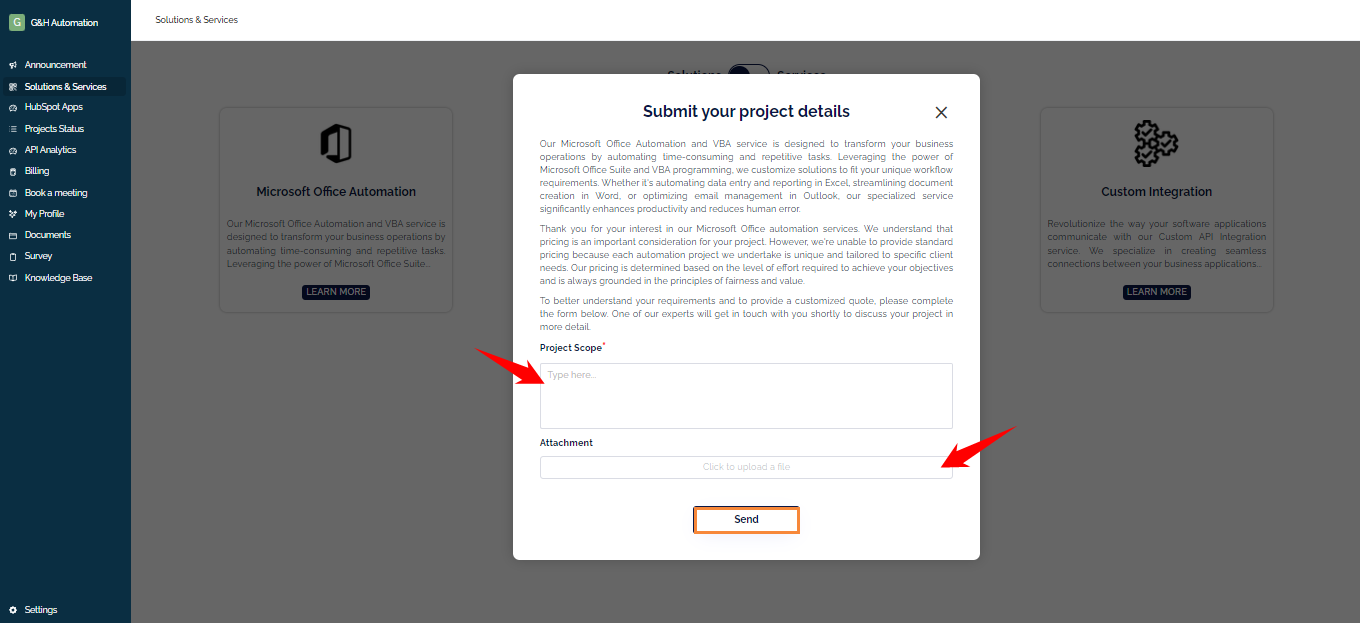
Provide information about your project scope and upload any relevant files or documents. This will allow our experts to better understand your needs and provide an accurate quote.
Step 04:
Click on the "Send" button to submit your project quote request.
Important Note:
One of our experts will then review your request and reach out to you promptly to discuss the next steps. We are committed to providing you with the best possible service and solution, tailored specifically to our client's needs.
Key Takeaways
-
G&H Automation offers customized quotes for projects to ensure the best possible solution for your specific needs.
-
You can request a quote through the G&H Automation Client Portal.
-
When requesting a quote, provide details about your project scope and upload any relevant files.
-
A G&H Automation expert will review your request and contact you to discuss the next steps.
💡Looking for Help?
Do you have further queries or require additional clarification? Feel free to reach out.