
📚 Table of Contents
1. Introduction
2. What is the G&H Automation Referral Program
3. How Referral Works?
4. How to Submit a Referral Form
5. Refferal Stats
6. Understanding Referral History
7. Key Takeaways
Introduction
The referral feature is a valuable tool that enables clients to refer someone to the platform by filling out a simple form. Once a referral is made, you can keep track of the referrals using the platform's referral history feature. This feature provides a comprehensive overview of referral activity, including details such as the referral's status, the amount earned, and more.
With this feature, clients can easily monitor their referral activity and earnings, enabling them to optimize their referral strategy and maximize their earnings potential. The referral history feature is a powerful tool that empowers you to succeed on the platform and make the most of referral opportunities.

What is the G&H Automation Referral Program
G&H Automation is thrilled to offer our Referral Program! We recognize the value of your business and want to show our appreciation by rewarding you for recommending our top-notch automation solutions. Whether your friend's business is struggling with inefficient processes or they're looking to implement cutting-edge technology to streamline operations, G&H Automation has the expertise to deliver exceptional results.
Refer a friend and earn a minimum of $1500!
It's a win-win situation! Your friend gets the automation solutions they need to take their business to the next level. With G&H Automation's expertise, they can improve efficiency, reduce costs, and gain a competitive edge. And you get rewarded for helping them out.
How Referral Works?
1. Submit the Referral Form: Head over to this page (link to the referral form, if available) and fill out the quick and easy referral form. All we need is your friend's name and email address. You can also add a personalized message to introduce them to G&H Automation and our amazing automation solutions. Once you hit submit, we'll take care of the rest!
2. Track Your Referral Progress: After submitting the form, you'll receive a confirmation email letting you know your referral is on its way. We'll also keep you updated on its status throughout the process. You'll be informed every step of the way, so you'll always know where things stand with your referral.
3. Claim Your Reward: The best part: once your referred friend becomes a G&H Automation customer and completes a qualifying project, you'll be eligible to receive your reward! In this program, you're guaranteed a minimum of $1500 – that's a great way to be thanked for your valuable referral. We'll notify you directly when your reward is ready to be claimed, so you can enjoy the benefits of helping both your friend and G&H Automation!
Note
Rewards may include discounts, freebies, or special offers, depending on our current referral program.
How to Submit a Referral Form
Step 01:
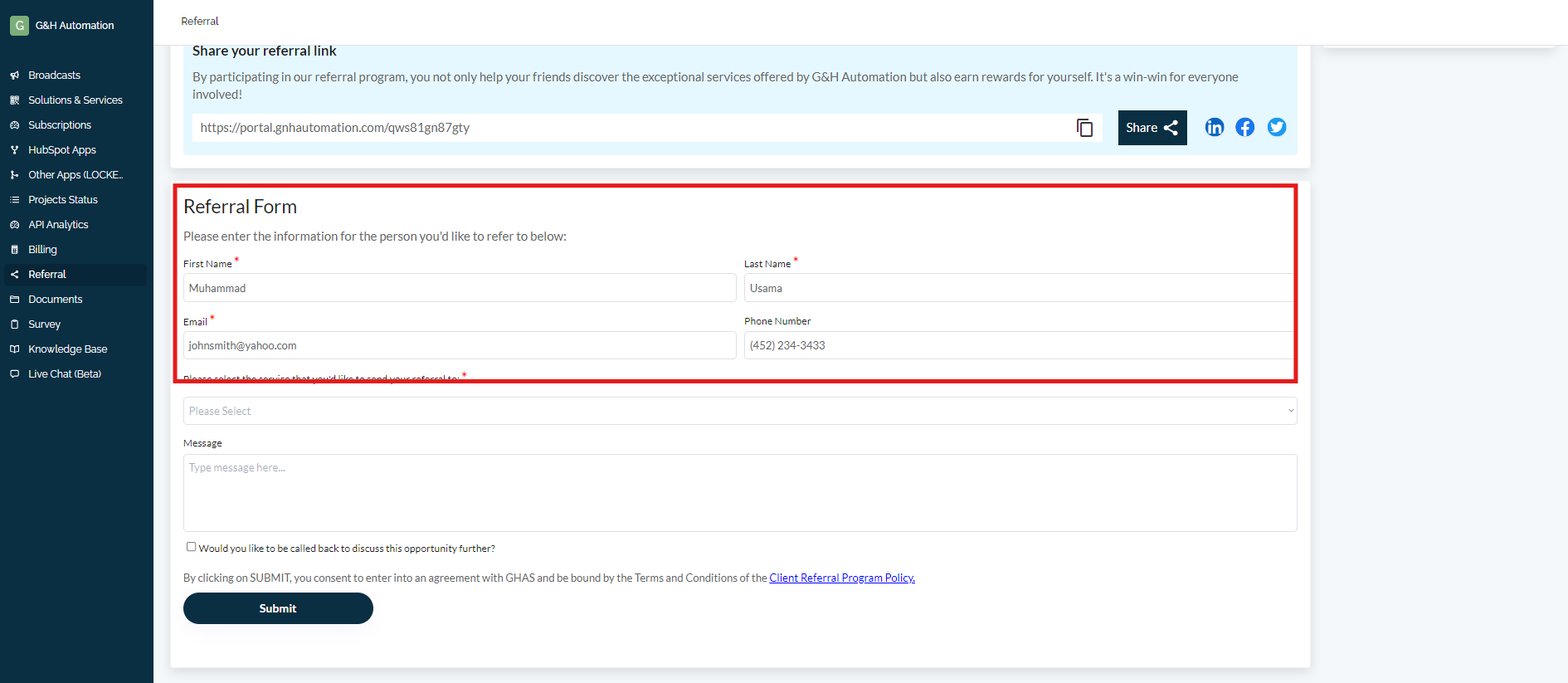
Go to the "Referral" from the menu. A new screen will open with a "Form".

Step 02:
Enter the details of the person to whom you would like to refer.
Step 03:
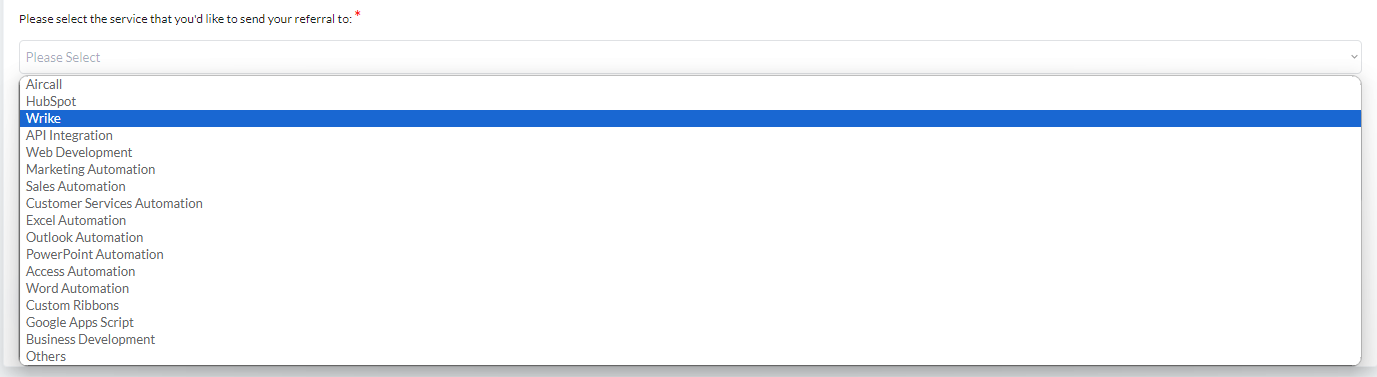
Select the service that you would like to send a referral to from the drop-down menu.
Step 05:
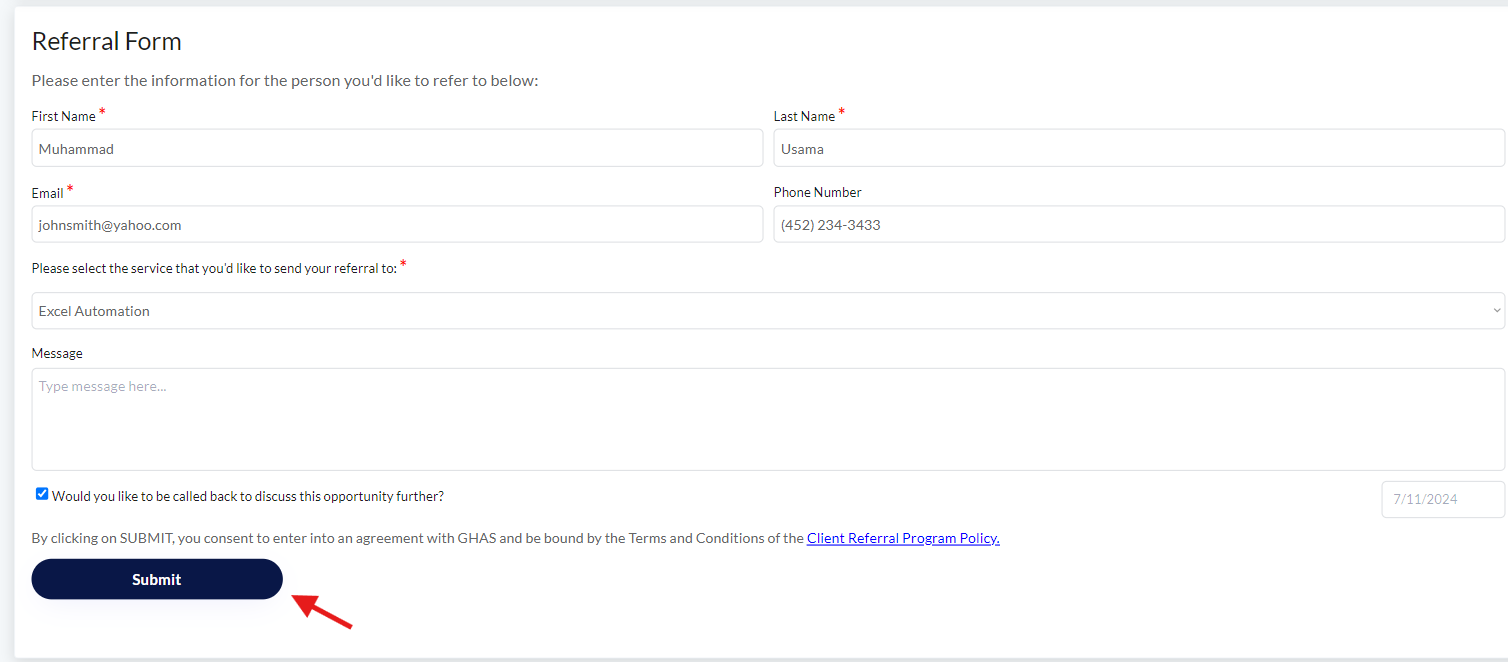
Enter your message/details if any.

Step 06:
Next, hit the check icon and select the date, if you want to call back to further discuss this opportunity.

Step 07:
Click on "Submit". Congratulations! You have successfully submitted the Form.
Share Your Referral Link
Use your unique referral link (which you can obtain by submitting a referral form) to post on social media or send directly to friends and colleagues. By helping them improve their business with G&H Automation's top-notch solutions, you'll both win – they get streamlined operations and you earn a minimum of $1500!
Referral Stats
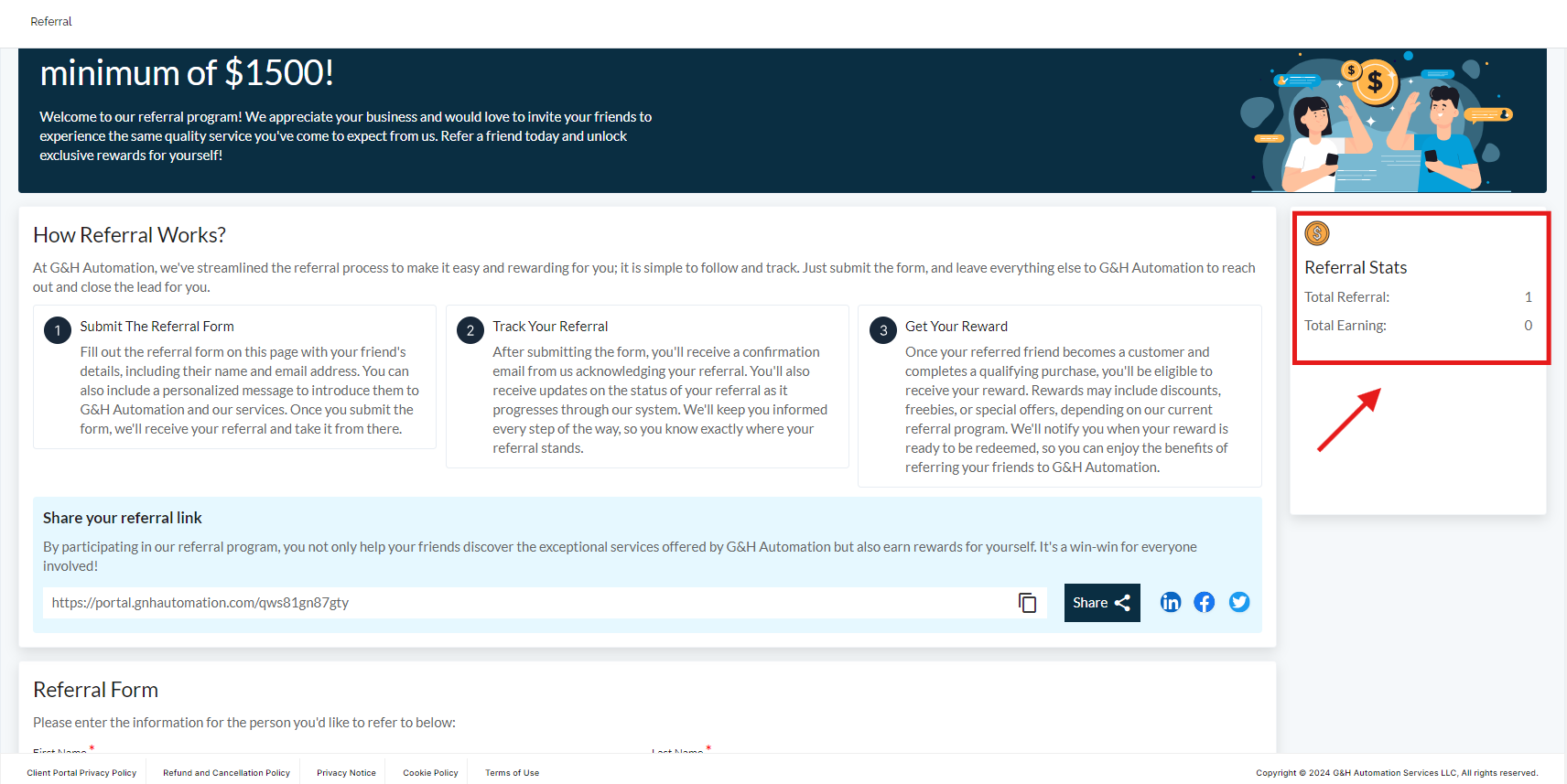
After submitting a referral, keep an eye on the referral status displayed conveniently on the right side of your screen. This is where you can track the progress of your referral, from the initial contact to project completion. Plus, you'll be able to monitor your growing earnings in real time – the more successful referrals you have, the more rewards you'll accumulate! It's a fantastic way to stay motivated and see the impact of your recommendations.
Understanding Referral History
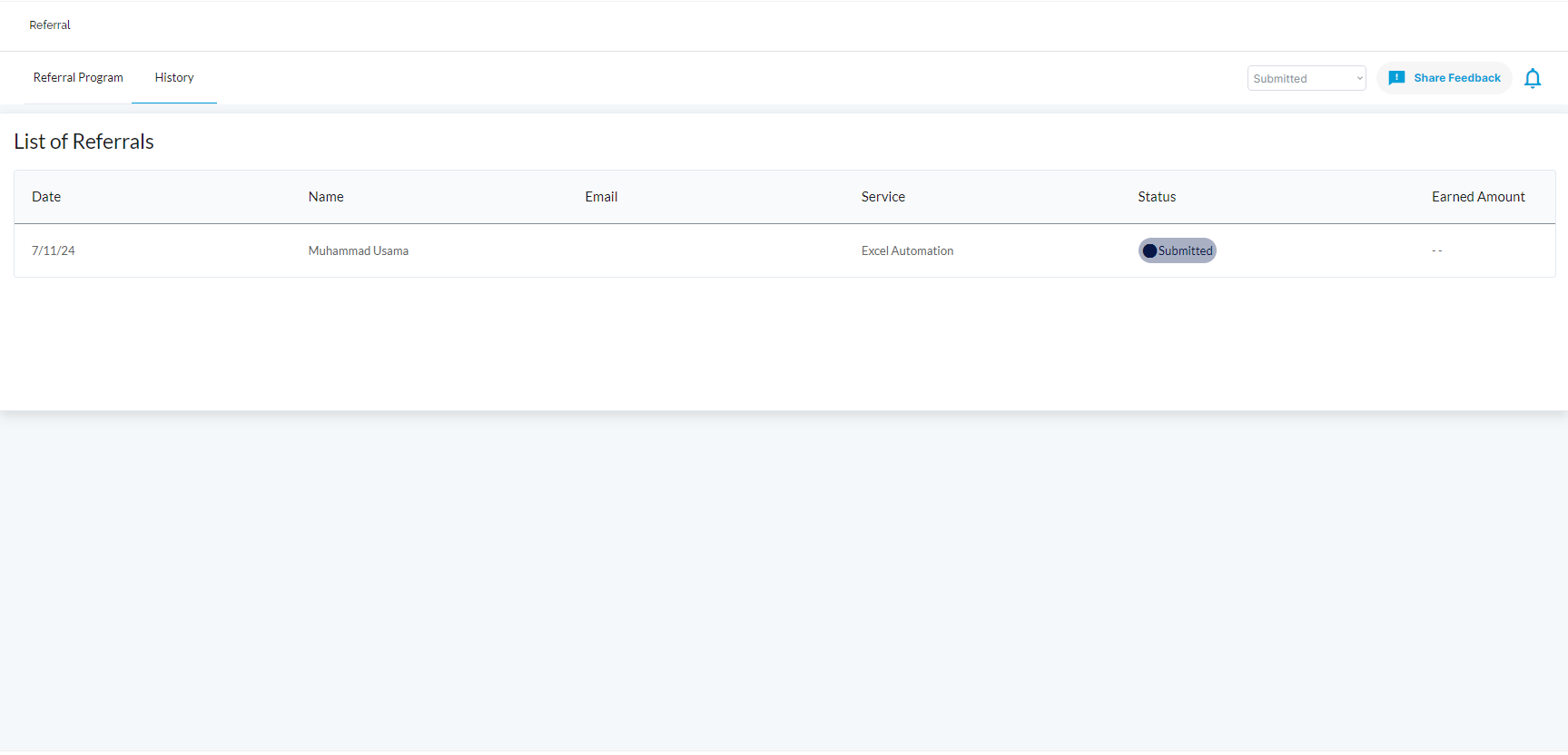
The referral history feature available on the G&H automation client portal is an incredibly useful tool that allows clients to stay on top of their referrals with utmost ease. With this feature, clients can keep track of all their referrals and access important details such as the referral's status, service, the amount earned, and more.
The best part is that the referral dashboard provides a visual representation of the status of each referred service, including whether it has been paid, submitted, under review, or dropped. This makes it super easy to monitor the progress of each referral and stay updated about their status.
Additionally, the referral dashboard comes equipped with a useful filter that lets you select a specific Status type and view only those referrals. This feature is incredibly handy for clients who want to focus on a particular set of referrals or those who want to quickly check on the status of their referrals.
Key Takeaways
-
Earn rewards for referring friends and colleagues to G&H Automation's automation solutions. The minimum reward is $1500 per successful referral.
-
Easily submit referrals through the dedicated "Referral" section of the client portal. Fill out a form with your friend's details, desired service, and an optional message.
-
Track referral progress in real time. Monitor the status (submitted, under review, completed) of each referral on your screen.
-
Gain insights from the referral history feature. This provides a detailed breakdown of each referral, including the service, amount earned, and current status.
-
Filter your referrals to focus on specific statuses (e.g., paid, dropped) for easier management.
💡Looking for Help?
Do you have further queries or require additional clarification? Feel free to reach out.